



Home > Feitian Fido Security Keys > Single-button FIDO Security Keys

Single-button FIDO Security Keys
Single-button FIDO Security Keys from Aftindia.in for sale
An affordable Single-button FIDO Security Keys shortcut to high security FIDO Certified Security Key. For mass quantity or more customization, please contact us.
FIDO Certified Security Key |Single-button FIDO Security Keys:
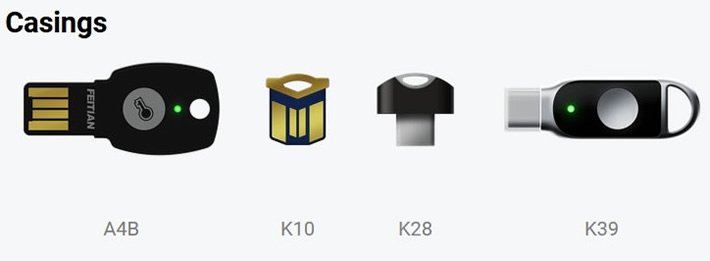
- A4B: FEITIAN ePass FIDO Security Key (A4B)
K10: FEITIAN ePass FIDO Security Key (K10)
K28: FEITIAN ePass FIDO Security Key (K28)
K39: FEITIAN ePass FIDO Security Key (K39)
Main Features of Single-button FIDO Security Keys
-
Feather light, still unique
ePass FIDO® Security Key adapts itself to your requirements. No matter metallic, extremely compact, water proof, touch button or even customized casing with your design. FEITIAN is able to provide various casings for ePass FIDO® Security Key to fit the different requirements from customers.
Infinity key pair storage
There is no limit to the number of accounts registered in ePass FIDO® Security Key.
Algorithms
SHA256 with ECDSA on P-256, brings top security to you all.
Driverless for all PC platforms
Recognized as a HID device, no driver is needed for ePass FIDO® Security Key to work on Microsoft Windows, macOS and Linux via USB.
USB Type-C
The built-in USB Type-C port makes ePass FIDO® Security Key (K21, K28) the perfect match for your cutting-edge computers.
Just unboxed?
Learn how ePass FIDO® Security Key adapts to several online services.
START USING
COMPATIBLE SERVICES
Here's the table based on the comparison you provided:
| Feature |
|
|
|
|
|---|---|---|---|---|
| USB-A | ● | ● | - | - |
| USB-C | - | - | ● | ● |
| FIDO2 | ● | ● | ● | ● |
| FIDO U2F | ● | ● | ● | ● |
| OATH HOTP | ● | ● | ● | ● |
| Preload Seeds | ● | ● | ● | ● |
| Smart Card (PIV) | - | - | - | ○ |
| Other Function | ○ | ○ | ○ | ○ |

-
● Available
-
- Not Available
-
○ Optional (Contact for more information)
Flexible customizations
We offer complete customization options for casing, packaging and related service to enable the ability of creating your very own ePass FIDO® Security Key.
Want to know more?
If you wish to request more detailed informations, specifications, quotations, or have any questions regarding FEITIAN ePass FIDO® Security Key, please feel free to contact us.
ePass FIDO2 (A4B)
- FIDO2 + FIDO U2F Keys
- USB-A
- USB-C
- Biometric Fingerprint
- Multiple Interfaces
- NFC
- BLE Bluetooth
- Apple iOS
- PIV
- Multipass Fido Series
What is Single-button FIDO Security Keys?
Single-button FIDO Security Keys are compact, physical devices that enhance online security by requiring user interaction—typically pressing a button—during the authentication process. These keys adhere to FIDO (Fast Identity Online) standards, such as FIDO U2F and FIDO2, providing robust protection against phishing and unauthorized access.
How Single-Button FIDO Security Keys Work:
-
Registration: During setup, the security key generates a unique cryptographic key pair. The public key is stored on the service's server, while the private key remains securely on the device.
-
Authentication: When logging in, after entering your username and password, the service challenges the key. You insert the key into a USB port (or connect via NFC or Bluetooth) and press its button. The key uses its private key to sign the challenge, verifying your identity.
Benefits of Using Single-Button FIDO Security Keys:
-
Enhanced Security: The physical presence of the key is required for authentication, reducing the risk of remote hacking attempts.
-
Phishing Protection: Since the key uses public-key cryptography and doesn't transmit sensitive data during login, it's immune to phishing attacks.
-
User Convenience: Authentication is as simple as inserting the key and pressing its button, streamlining the login process.
-
Multi-Service Compatibility: A single security key can be registered with multiple FIDO-enabled services, simplifying management.
Major tech companies, including Google, Microsoft, and Facebook, support FIDO security keys, highlighting their effectiveness in securing online accounts.
Incorporating a single-button FIDO security key into your authentication process offers a tangible and user-friendly method to safeguard your digital identity.